참조 URL:
https://langchain-ai.github.io/langgraph/how-tos/memory/add-memory/
Add memory
Add and manage memory AI applications need memory to share context across multiple interactions. In LangGraph, you can add two types of memory: Add short-term memory Short-term memory (thread-level persistence) enables agents to track multi-turn conversati
langchain-ai.github.io
관련 패키지 설치
uv add "psycopg[binary,pool]" langgraph langgraph-checkpoint-postgres
먼저 마지막 실행부분을 먼저 보면 thread_id 1에서 이름이 Bob인걸 알려주고 thread_id 2에서 이름을 다시 물어봄
thread_id 가 달라 이름을 모르거 같지만 장기 메모리에 저장된 내용을 찾아서 알려줌
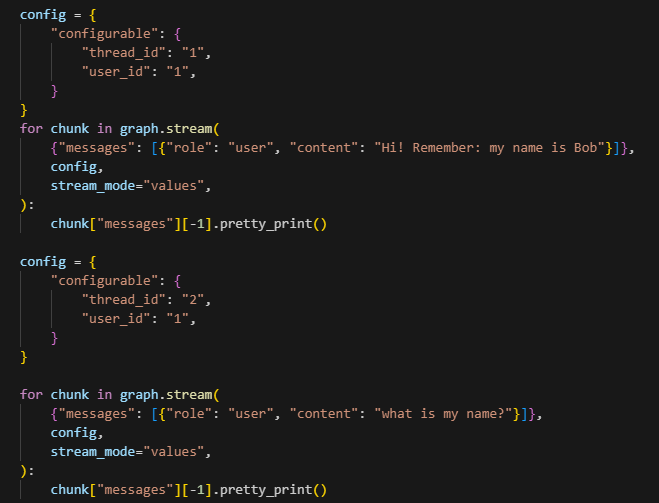
thread_id 1 실행결과

thread_id 2 실행결과

메모리에서 해당 내용을 검색하는 코드
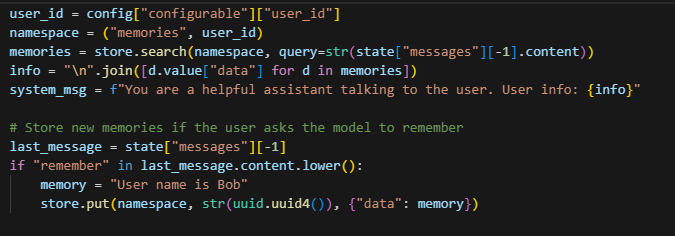
thread_id와 상관없이 user_id로 namespace를 설정하여 데이터를 검색하여 추가해 줌
"remember"라는 키워드로 데이터를 찾는걸 보니 사용하려면 별도의 저장 조회 방법을 생각해봐야 할 거 같음
기억해줘 이런 말이 있으면 특정 키워드를 자동으로 추가하여 저장한다던지 그런게 필요할 듯
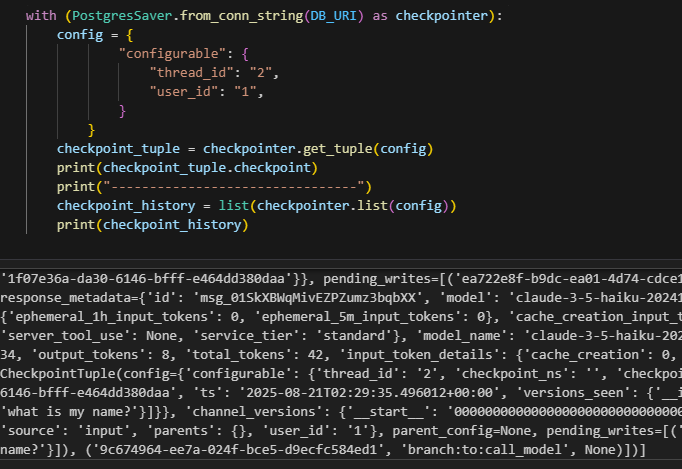
대화 내용 조회
전체 코드
from langchain_core.runnables import RunnableConfig
from langchain.chat_models import init_chat_model
from langgraph.graph import StateGraph, MessagesState, START
from langgraph.checkpoint.postgres import PostgresSaver
from langgraph.store.postgres import PostgresStore
from langgraph.store.base import BaseStore

import uuid
import os
from dotenv import load_dotenv

load_dotenv()

model = init_chat_model(model="anthropic:claude-3-5-haiku-latest")
DB_URI = os.getenv("DB_URL")

with (
    PostgresStore.from_conn_string(DB_URI) as store,
    PostgresSaver.from_conn_string(DB_URI) as checkpointer,
):
    # 처음 1회만 실행
    # store.setup()
    # checkpointer.setup()

    def call_model(
        state: MessagesState,
        config: RunnableConfig,
        *,
        store: BaseStore,
    ):
        user_id = config["configurable"]["user_id"]
        namespace = ("memories", user_id)
        memories = store.search(namespace, query=str(state["messages"][-1].content))
        info = "\n".join([d.value["data"] for d in memories])
        system_msg = f"You are a helpful assistant talking to the user. User info: {info}"

        # Store new memories if the user asks the model to remember
        last_message = state["messages"][-1]
        if "remember" in last_message.content.lower():
            memory = "User name is Bob"
            store.put(namespace, str(uuid.uuid4()), {"data": memory})

        response = model.invoke(
            [{"role": "system", "content": system_msg}] + state["messages"]
        )
        return {"messages": response}

    builder = StateGraph(MessagesState)
    builder.add_node(call_model)
    builder.add_edge(START, "call_model")

    graph = builder.compile(
        checkpointer=checkpointer,
        store=store,
    )

    config = {
        "configurable": {
            "thread_id": "1",
            "user_id": "1",
        }
    }
    for chunk in graph.stream(
        {"messages": [{"role": "user", "content": "Hi! Remember: my name is Bob"}]},
        config,
        stream_mode="values",
    ):
        chunk["messages"][-1].pretty_print()

    config = {
        "configurable": {
            "thread_id": "2",
            "user_id": "1",
        }
    }

    for chunk in graph.stream(
        {"messages": [{"role": "user", "content": "what is my name?"}]},
        config,
        stream_mode="values",
    ):
        chunk["messages"][-1].pretty_print()

# 대화내용 조회
with (PostgresSaver.from_conn_string(DB_URI) as checkpointer):
    config = {
            "configurable": {
                "thread_id": "2",
                "user_id": "1",
            }
        }
    checkpoint_tuple = checkpointer.get_tuple(config)
    print(checkpoint_tuple.checkpoint)
    print("--------------------------------")
    checkpoint_history = list(checkpointer.list(config))
    print(checkpoint_history)
'LangGraph' 카테고리의 다른 글
| LangGraph로 EDA만들기 (3) - supervisor state사용 (완) (0) | 2025.06.26 |
|---|---|
| LangGraph로 EDA만들기 (2) - Supervisor 생성 (1) | 2025.06.20 |
| LangGraph로 EDA만들기 (1) (5) | 2025.06.20 |
| LangGraph Supervisor 예제 (4) | 2025.06.19 |

